Daily Coordination for Mac

Keep your tools.
Regain your day.

HWH turns scattered commitments from Apple Mail, Apple Calendar, Apple Reminders, Things 3, Todoist, Asana, Jira, and Redmine into one plan you can execute without constant re-triage.

Native macOS app. Available soon on the Mac App Store. Download will be free, with features unlockable over time by “grinding.” Founder Pack will be optional for instant full unlock.

One clear next task Works with your current stack Built for interruption-heavy days
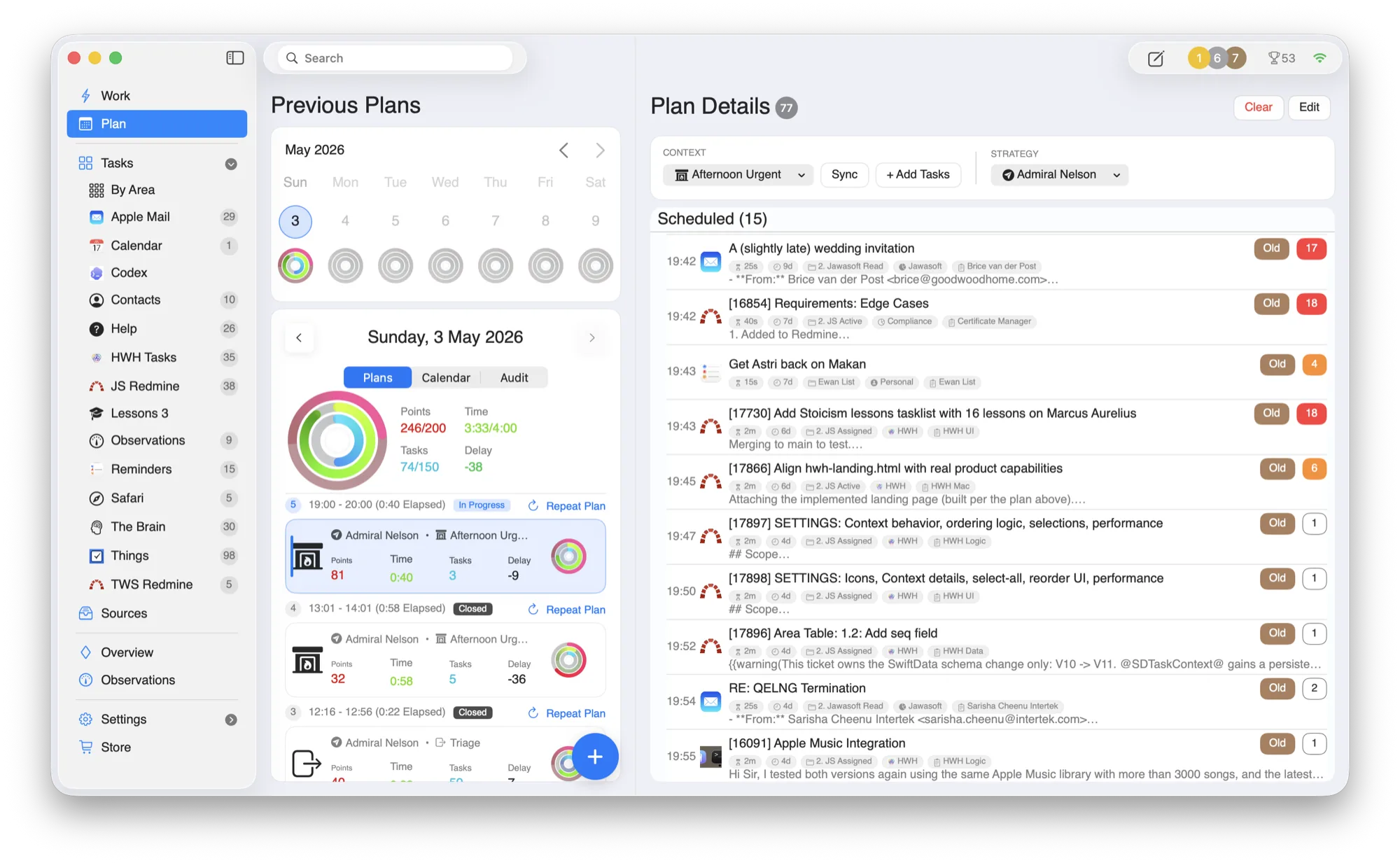
HWH — Today’s Plan
HWH macOS app showing the daily plan, activity rings, and scheduled tasks pulled from connected tools
Today, sequenced All your tools, one plan
No. 01

Three steps from scattered inputs to focused execution.

HWH is a coordination layer, not a replacement system. You keep the specialist tools; HWH handles the daily stitching and prioritization.

01

Collect

Pull commitments from Apple Mail, Apple Calendar, Apple Reminders, Things 3, Todoist, Asana, Jira, and Redmine into one operational inbox.

02

Plan

Convert raw inputs into a realistic day plan with clear sequencing and time-aware adjustments.

03

Execute

Work one current task at a time, with direct links back to source context when needed.

Current Task

Exactly one task is highlighted so you can start immediately without scanning a long backlog.

Replan Fast

Delay, swap, or complete work in one move when the day changes.

Source Context

Jump to the original tool instantly for details, then return to the plan.

Life Areas

Group every task by Health, Wealth, Happiness, or your own — so nothing quietly disappears.

Time Budget

Set how much of the day each area gets. HWH shows planned vs. actual and warns before you over-commit.

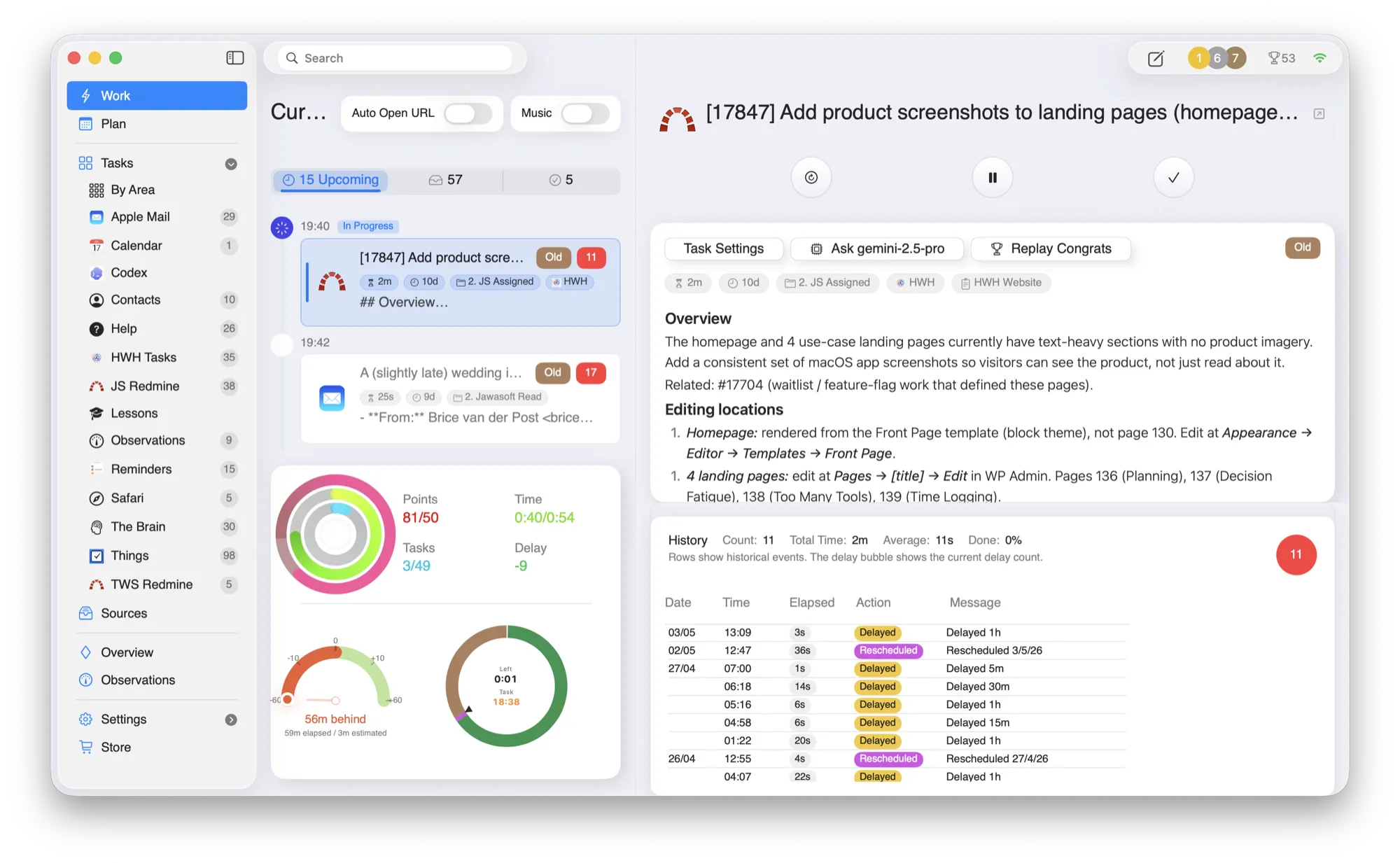
One task at a time.

The current task, with its full context.

HWH highlights exactly one task to work now, with the source material — the email, the ticket, the note — right beside it, plus activity rings tracking effort across your life areas.

Shown: the Work view, with a Redmine ticket open in place. Jump to the original tool when you need detail, then return to the plan.

HWH — Work
HWH macOS app Work view showing the current task with source context
No. 02

Built around the tools you already trust.

HWH works best when it reduces coordination overhead without forcing another migration project.

Apple MailApple CalendarApple Reminders Apple ContactsThings 3Todoist AsanaJiraRedmine Safari Reading ListTheBrain

Lower decision fatigue

Fewer visible choices at any one moment means faster starts and fewer context switches.

More reliable follow-through

Priority stays tied to real commitments, not whichever app is loudest.

No. 03

Progress systems that reinforce daily execution.

Beyond planning, HWH helps you see where time went, measure progress against goals, and stay motivated enough to keep showing up.

i.

Detailed Time Logging

Track time on each task, then roll it up by project and area to understand effort, drift, and delivery patterns.

ii.

Goal Observations & Metrics

Record Observations tied to goals so progress metrics stay visible over time, not lost in scattered notes.

iii.

Gamified Momentum

Points, streaks, and milestone unlocks create a lightweight motivation loop that supports consistency.

No. 04

For Mac knowledge workers managing complex, interruption-heavy days.

Designed for founders, operators, consultants, and project leads who need one practical view of what matters now.

Founders

Move between strategy, hiring, product, and customer work without losing the thread.

Operators

Coordinate cross-functional commitments while keeping execution windows protected.

Consultants

Track client obligations and delivery blocks across multiple systems with less overhead.

No. 05

Explore HWH by use case.

However the day gets away from you, there’s a way in. Each page goes deep on one problem HWH is built to solve.

No. 06

Earn your features by doing the work.

HWH starts simple and grows with you. Log time and close tasks to earn points, then spend them to unlock more powerful features — real goals to work toward. Nothing is ever withheld: every feature is free to earn, and the Founder Pack just lets you skip the grind.

HWH — Store
HWH Store showing the Founder Pack and the premium features you can unlock by earning points
Free · the grind

Earn it as you go

Free, forever
  • Unlock every feature through normal use
  • Earn points for logging time and closing tasks
  • Genuine goals to work toward as you go
  • Best if you enjoy the journey — or are patient
Optional · one-time

Founder Pack

£29.99 once
  • Unlock all 32 premium features instantly
  • No subscription — you own it outright
  • Skip the grind, keep every feature
  • Best if you want full power on day one
No. 07

Common questions, answered directly.

Do I need to move all tasks into HWH?
No. HWH coordinates the tools you already use. Your source systems stay in place.
Is HWH replacing my calendar or task manager?
No. HWH sits above those tools to help you prioritize and execute across them.
Is this a subscription product?
No subscription will be required. HWH will be available soon as a free Mac App Store download, with all features unlockable through normal use and “grinding.” Founder Pack will be optional if you want instant full unlock.
When does it launch?
Available soon. Join the waitlist and we’ll let you know the moment HWH is available on the Mac App Store.

Be among the first to try HWH.

Join the waitlist and we’ll let you know as soon as HWH is available on the Mac App Store. No spam.