Keep your tools.
Regain your day.
HWH gathers what's scattered across your mail, calendar, tasks, and tickets into one plan you can actually execute without re-triaging your whole system every morning.
Native macOS app · Available now on the Mac App Store · Free to download, every feature earnable through use.
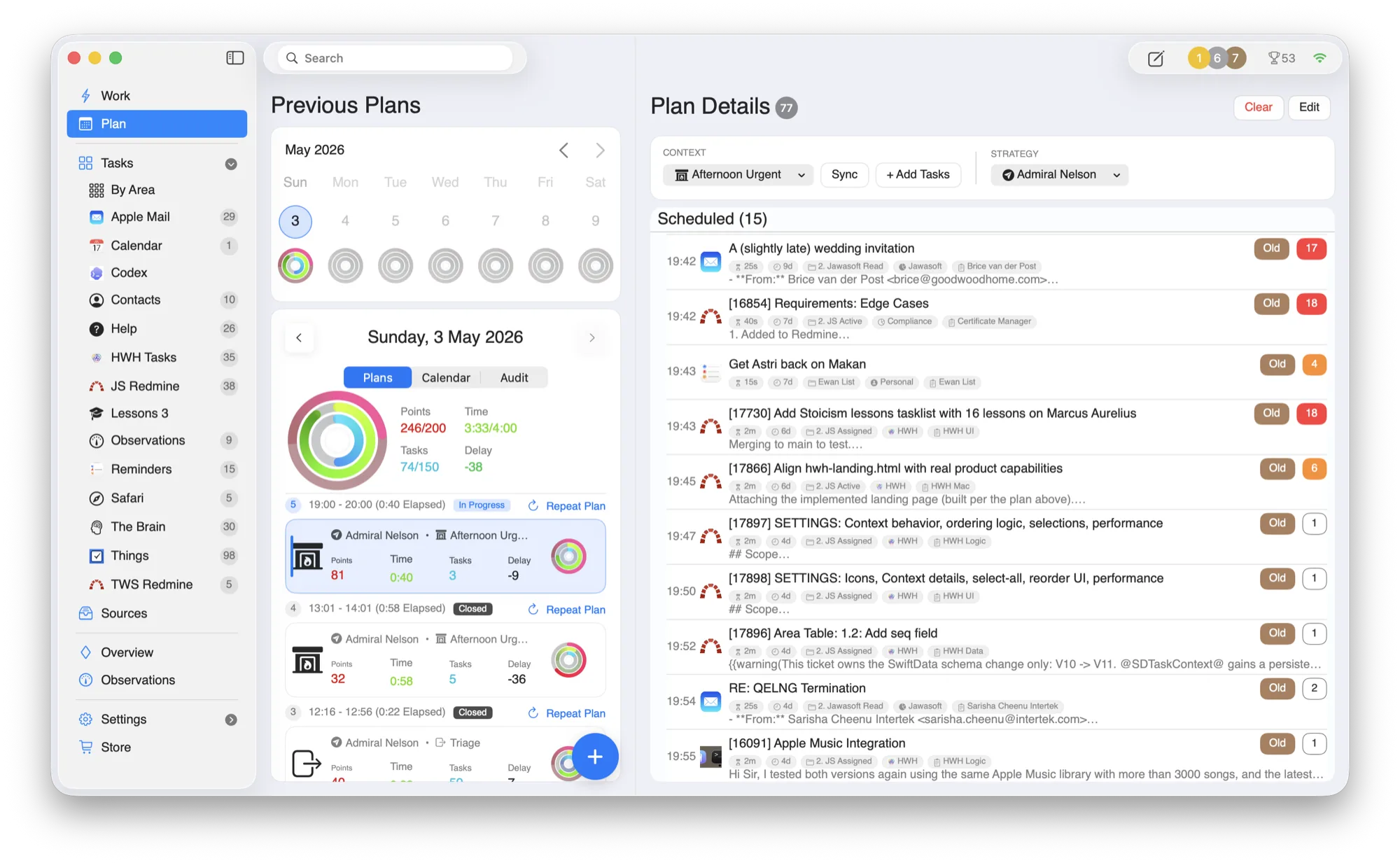
Your plan is built on your Mac.
HWH keeps its primary database and planning work on your Mac, with no HWH app account or central copy of your task database. Connected tools, optional AI, diagnostics, Game Center, and website services have separate, bounded data flows described in the privacy policy.
Local planning core
The primary database, plan construction, and prioritization run on your Mac.
No HWH app account
Download and run without creating a profile or syncing a central HWH task database.
Explicit connections
Choose which integrations to enable. Their current reads, writes, and controls are documented source by source.
Yours to keep
A one-time app, not a subscription. No renewal, no lock-in, no data held hostage.
Three steps from scattered inputs to focused execution.
HWH is a coordination layer, not a replacement. You keep the specialist tools; HWH handles the daily stitching and prioritization.
Collect
Pull commitments from Apple Mail, Calendar, Reminders, Apple Contacts, Things 3, OmniFocus, Todoist, Asana, Jira, Redmine, Safari Reading List, and TheBrain into one operational inbox.
Plan
Turn raw inputs into a realistic day with clear sequencing and time-aware adjustments as things shift.
Execute
Work on exactly one task at a time, with direct links back to source context whenever you need it.
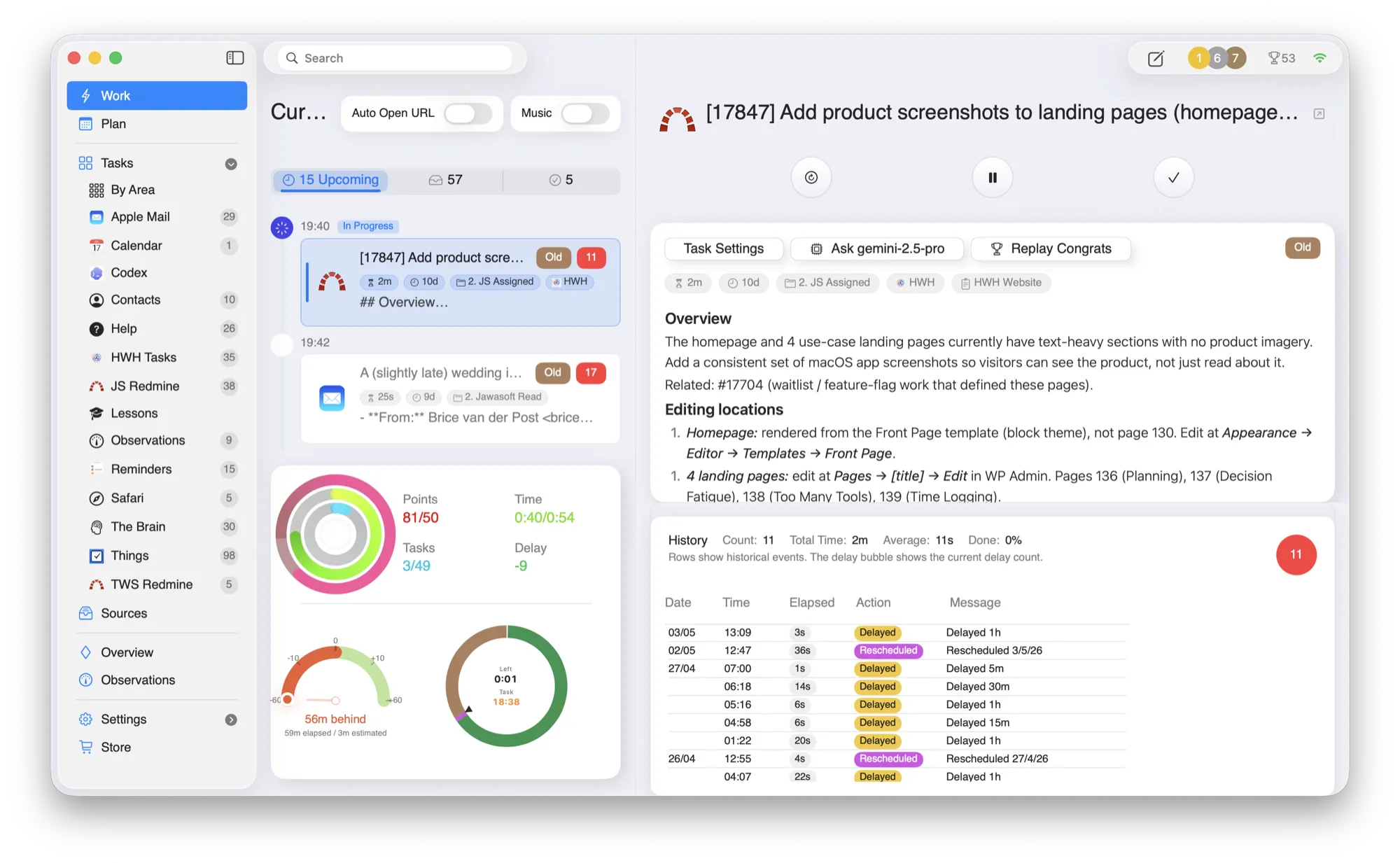
The current task, with its full context.
HWH highlights exactly one task to work now, with the source material, the email, the ticket, the note, right beside it, and activity rings tracking effort across your life areas.
- —Replan fast. Delay, swap, or complete work in one move when the day changes.
- —Source context. Jump to the original tool for detail, then return to the plan.
- —Life areas & time budget. Group tasks by Health, Wealth, Happiness, and see planned vs. actual.
Built around the tools you already trust.
HWH works best when it lowers coordination overhead without forcing another migration. Connect what you use today.
Six ways HWH lowers daily coordination drag.
Each use case shows the same idea from a different angle: keep your current systems, then let HWH turn them into one day you can actually run.
Planning
Build a day plan that survives interruptions.
Decision Fatigue
Lock onto one clear next step.
Too Many Tools
One coordination layer across your stack.
Time Logging
See where time actually went.
Work-Life Balance
Give the rest of life its hours, not just work.
Habit Tracker
Track the metrics that matter and keep it up.
Starts simple. Grows as you do.
HWH opens clean and uncluttered, so there's nothing to learn on day one. As you log time and close tasks, more advanced features unlock exactly when you have a use for them.
It's progressive by design, not a paywall. Every feature is free to earn through normal use. The Founder Pack simply switches everything on at once if you'd rather not wait.
Detailed time logging
Roll effort up by project and area to understand drift and delivery.
Goal observations, metrics, and habit tracking
Tie observations, habits, and metrics to goals so progress stays visible over time.
Gamified momentum
Points, streaks, and milestones keep a light motivation loop running.
One honest price, or none at all.
Download free and you start with 3 silver coins, about 10 days' head start, to unlock the integrations and features you need to get going. Earn the rest through normal use, or switch everything on at once with the Founder Pack.
Starts with 3 silver coins to spend however you need.
- ✓ 3 silver coins up front, about 10 days' head start
- ✓ Unlock the integrations and features you need first
- ✓ Earn more coins by logging time and closing tasks
- ✓ Best if you enjoy the journey, or are patient
Skip the grind. Everything on, the moment you launch.
- ✓ Every premium feature unlocked instantly
- ✓ No subscription, you own it outright
- ✓ Keeps the lights on for an indie Mac app
- ✓ Best if you want full power on day one
Built by Ewan Makepeace for work that refuses to live in one app.
Ewan is the founder and developer of HWH. The product grew from a first-hand coordination problem: one working day scattered across mail, calendars, task apps, project trackers, notes, and client systems.
HWH is deliberately a native macOS coordination layer, not another place that demands a full migration. Exact local storage, connected-service, AI, diagnostics, and website data flows are documented in the privacy policy.
“I built HWH because my own work was scattered across eight apps and none of them could tell me what to do next. I wanted a quiet layer on top of the tools I already trusted.”
Common questions, answered directly.
Where does my data actually go?+
HWH stores its primary app data and builds your plan on your Mac. Connected tools, optional AI, diagnostics, Game Center, and website services each have their own bounded data flow. The privacy policy explains what is local, what can be sent, and which controls are available.
Do I need to move all my tasks into HWH?+
No. HWH coordinates the tools you already use. Your source systems stay exactly where they are, and there is no lock-in. If you stop using HWH, your existing systems are still current and usable on their own.
Is this a subscription?+
The launch version is a free Mac App Store download, with every feature earnable through normal use. The optional Founder Pack is a one-time purchase if you'd rather unlock everything at once.
Where can I download HWH?+
HWH is available now. Download it from the Mac App Store.
Make room for what matters.
Download HWH and bring your tasks, time, and priorities into one daily plan on your Mac.
Free to download, with every feature earnable through use. Read the privacy policy.
Download on the Mac App Store