See where time actually went without a second manual system.
HWH links planning, execution, and time logging so billable effort, estimates, and delivery patterns become visible as a side effect of doing the work.
Native macOS app · Available now on the Mac App Store · Free to download, every feature earnable through use.
The timer follows the task.
Manual time tracking breaks when it depends on memory. HWH starts from the current task, so effort can roll up to projects and life areas naturally.
Start
from the task you are actually working on.
Capture
time against the source project and life area.
Review
planned versus actual effort after the day moves.
Improve
future plans with execution data instead of guesswork.
Capture time and progress as a side effect of execution.
HWH links planning and execution so you understand actual effort without maintaining a second, disconnected tracking workflow.
Detailed time logging
Track time per task, then roll up by project and area for operational visibility.
Observation-based progress
Tie observations to goals to make progress and drift visible over time.
Better estimates and planning
Use execution data to improve future timelines and commitment quality.
Built for client work
Ideal for consultants, freelancers, agencies, and small teams that need visibility into effort and delivery.
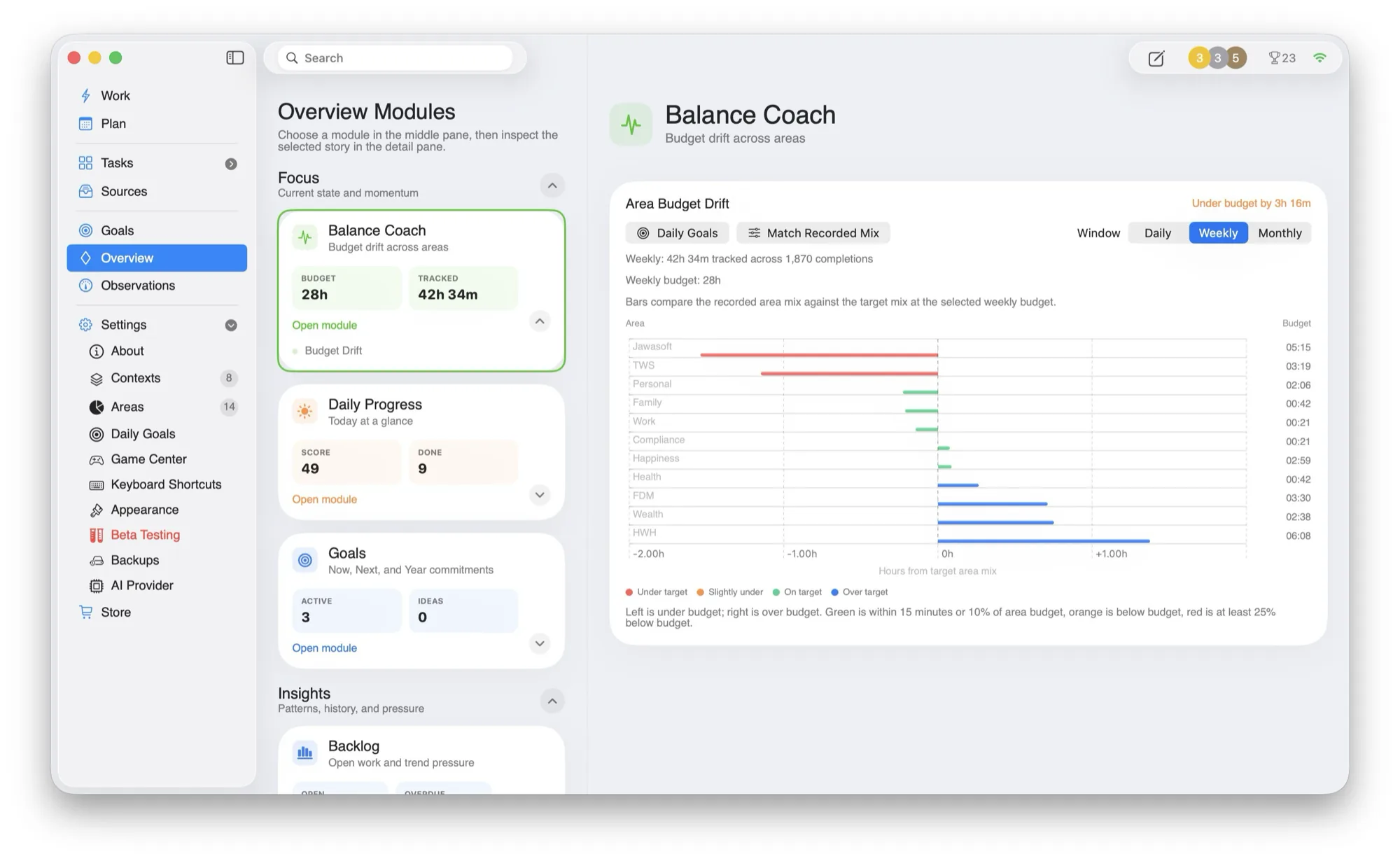
Budgeted time versus what you actually spent.
Balance Coach rolls up tracked time against the budget you set for each area, then shows where the day drifted.
- —Project rollups. See effort by task, client, project, and area.
- —Planning feedback. Use actuals to tighten future plans.
- —Habit tracking. Combine effort data with observations and metrics when progress depends on consistency.
A billable task can carry its context into the time record.
The timer follows the current task, so a consultant can move from planning to focused work and later review actual effort without reconstructing the day from memory.
- Plan
Choose the client task
Bring the task or ticket into today's order with its client, project, estimate, and source context available.
- Start
Work from the current task
Begin the task from HWH's focused Work view so the active effort is tied to the item you actually selected.
- Record
Complete or interrupt honestly
End the task when the work stops. The resulting actual can roll up to the project and life area instead of relying on an end-of-day guess.
- Review
Compare planned with actual
Use Balance Coach to see where effort exceeded the budget and carry that evidence into the next estimate.
Who this time-logging workflow fits
- Consultants and freelancers who already organize work as client tasks or tickets.
- People who want time data to improve estimates and daily planning.
- Small teams that need personal effort visibility without a separate manual timer list.
Honest limitation: HWH records operational effort; it is not a billing or payroll system. Confirm billable rules and submit invoices in the accounting or client system responsible for them.
Questions people ask
Do I have to remember every timer at the end of the day?
The intended workflow starts from the current task and records completion or interruption when it happens, reducing end-of-day reconstruction.
Can actual time improve future plans?
Yes. Compare planned and actual effort by task, project, client, or life area, then use the difference when budgeting the next day.
Build the next day from better estimates · See how source tasks stay connected · Read why Ewan built HWH
Built around the tools you already trust.
HWH works best when it lowers coordination overhead without forcing another migration. Connect what you use today.
Make room for what matters.
Download HWH and bring your tasks, time, and priorities into one daily plan on your Mac.
Free to download, with every feature earnable through use. Read the privacy policy.
Download on the Mac App Store