Build a realistic day plan that still works when the day changes.
HWH turns scattered commitments into a sequenced day plan you can execute, then keeps it flexible when meetings move, tickets flare up, or the available hours change.
Native macOS app · Available now on the Mac App Store · Free to download, every feature earnable through use.
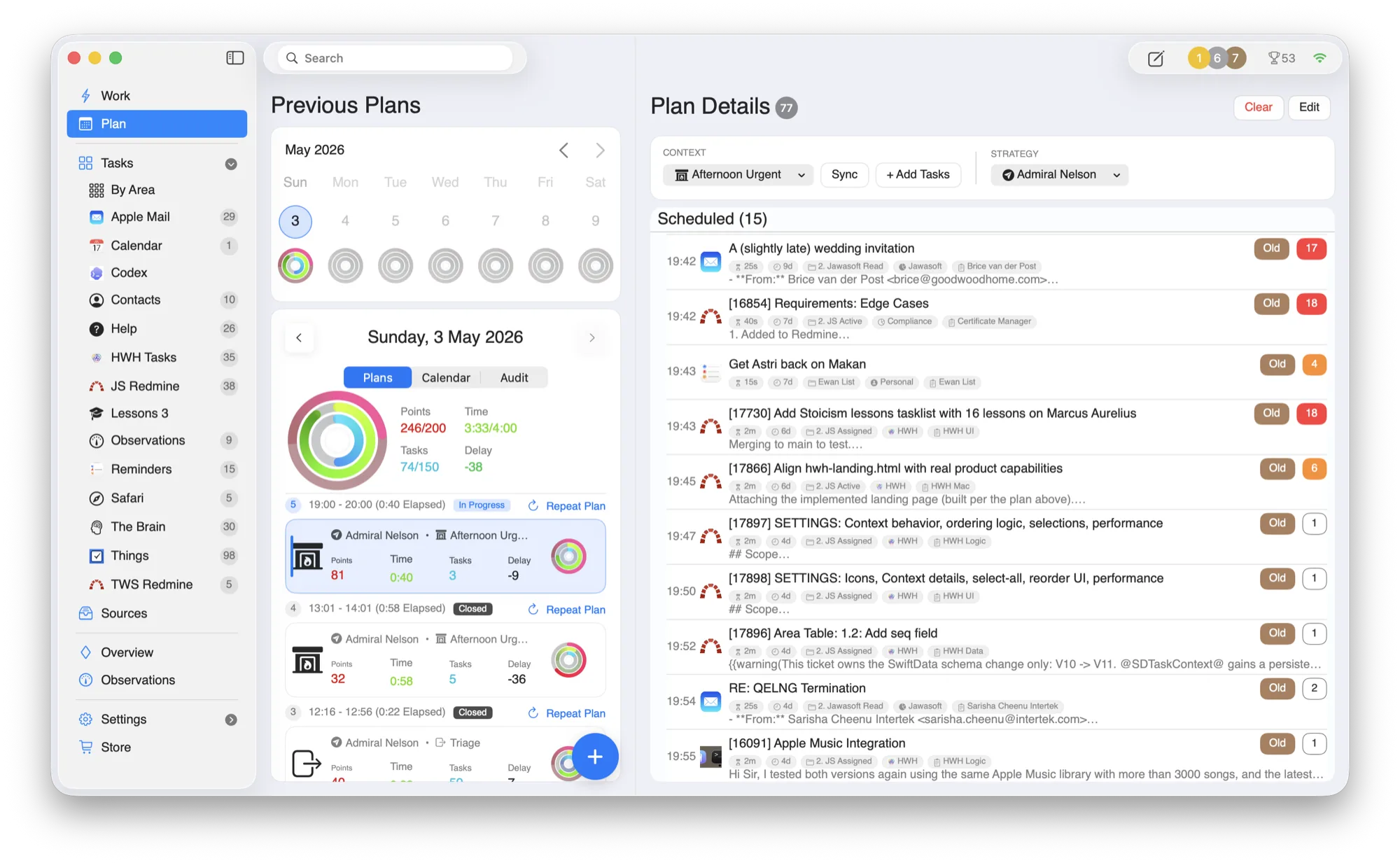
Monday morning, after the plan changes.
Planning is where HWH earns trust: it absorbs the interruption, keeps source systems intact, and turns the day back into a sequence you can actually start.
Collect
the changed calendar, task, and ticket signals.
Sort
work by life area and current urgency.
Budget
the day against the hours still available.
Resume
with one current task instead of rebuilding the whole plan.
From scattered inputs to a day you can trust.
HWH is a coordination layer, not a replacement. You keep the specialist tools; HWH handles the daily stitching and prioritization.
Collect
Pull commitments from Apple Mail, Calendar, Reminders, Apple Contacts, Things 3, OmniFocus, Todoist, Asana, Jira, Redmine, Safari Reading List, and TheBrain into one operational inbox.
Plan
Turn raw inputs into a realistic day with clear sequencing and time-aware adjustments as things shift.
Replan
Delay, swap, or repeat tasks in one move when context changes.
Execute
Work on exactly one task at a time, with direct links back to source context whenever you need it.
Your whole day, sequenced.
Previous plans, today’s order, and full task detail live in one place, with activity rings tracking effort across your life areas.
- —Source context. Open the original email, ticket, task, or note when details are needed.
- —Life areas. See how work fits across Health, Wealth, Happiness, and your own areas.
- —Interruptions handled. Rebuild the day without rebuilding your entire planning system.
A worked replanning pass after the morning changes.
This is the practical sequence HWH is designed to support: rebuild the order once, preserve the source context, and return to one current task.
Start from real commitments
HWH collects the day's calendar blocks, selected tasks, mail, and tickets into one candidate plan.
Absorb the calendar change
A meeting moves into the morning. Rebudget the remaining hours instead of pretending the original plan still fits.
Place the urgent ticket
An urgent Redmine ticket enters the plan with its source link, beside the work that now needs to move.
Resume one task
Delay or reorder lower-priority work, then return to a single current task rather than re-triaging every list.
Who this planning workflow fits
- People whose days change through meetings, support work, mail, or tickets.
- People who already trust several specialist tools and need one executable order.
- People who want to protect Health, Wealth, Happiness, and other life areas in the same time budget.
Honest limitation: HWH is not a team project planner and cannot know which trade-off matters most to you. It provides the coordination surface; you still choose the priority when two commitments conflict.
Questions people ask
Does HWH replace my calendar or task manager?
No. It coordinates selected commitments and keeps links back to the source systems, which remain usable on their own.
What happens when the plan changes again?
Replan the remaining hours, delay or reorder affected work, and continue from the next current task.
See how HWH coordinates too many tools · Use actual effort to improve the next plan · Read why Ewan built HWH
Built around the tools you already trust.
HWH works best when it lowers coordination overhead without forcing another migration. Connect what you use today.
Make room for what matters.
Download HWH and bring your tasks, time, and priorities into one daily plan on your Mac.
Free to download, with every feature earnable through use. Read the privacy policy.
Download on the Mac App Store